
Copilot Has Access to Everything Your Users Can Access — Is That Safe?
Most organizations have more exposure than they realize. In a typical M365 environment audit, we identify an average of 20 security and compliance risks — including critical issues like anonymous sharing links accessible by anyone and SharePoint sites with open permissions at the root level, affecting thousands of files.
Our M365 Permissions Audit gives you a complete picture of your environment before you flip the Copilot switch. We scan every SharePoint site, OneDrive, Teams workspace, and group in your tenant — score your readiness against the Microsoft Cloud Adoption Framework (CAF) — and give you a clear, prioritized plan to fix what needs fixing.
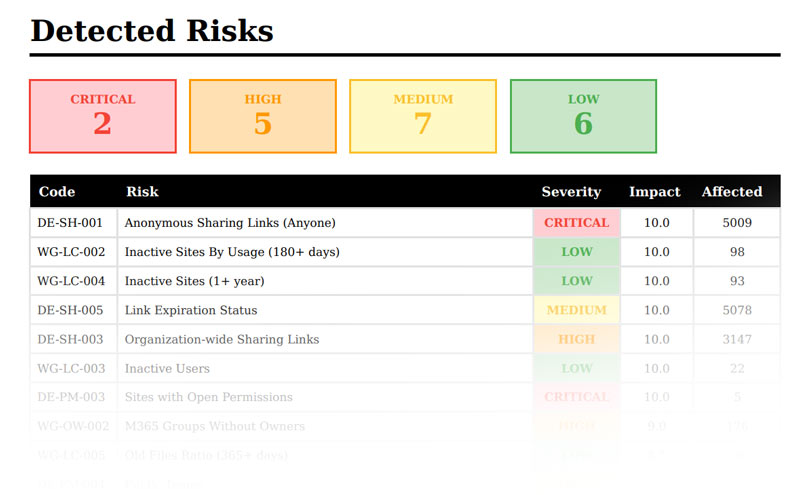
A sample risk output from our assessment — showing severity ratings, impact scores, and the number of affected files or users for every finding in your M365 environment.
The Risks of Getting AI Wrong
Enabling Copilot on an unprepared M365 environment doesn't just create a bad user experience — it creates serious security and compliance exposure. Here's what we commonly find:
Anonymous Sharing Links
"Anyone with the link" permissions mean files are accessible to anyone — inside or outside your org. Copilot can surface this content to any user who asks.
Open Site Permissions
SharePoint sites with "Everyone" access at the root level expose every file in that library to your entire organization — including through Copilot queries.
Org-Wide Sharing Links
Files shared with "People in your organization" links can be accessed by any authenticated user — without being explicitly granted permission.
Links Without Expiration
Sharing links with no expiration date remain active indefinitely — quietly exposing documents long after the original sharing need has passed.
Inactive & Guest Accounts
Inactive users and stale guest accounts still hold access rights — creating unnecessary exposure and potential entry points for unauthorized access.
Governance & Ownership Gaps
Groups and Teams with no assigned owners, missing sensitivity labels, and public visibility become ungoverned data repositories that Copilot can freely access.
What the Assessment Covers
Our assessment is a comprehensive automated scan of your entire M365 tenant, evaluated against the Microsoft Cloud Adoption Framework across four key pillars:
Governance Review
We evaluate your access controls, permission policies, administrative oversight, and M365 group ownership — identifying orphaned groups, single-owner workspaces, and ungoverned Teams that create risk.
Data Security Audit
We scan every SharePoint site and OneDrive for anonymous sharing links, open permissions, organization-wide links, external sharing, and links without expiration — the most common sources of data exposure before Copilot deployment.
Compliance Assessment
We check your regulatory alignment, sensitivity label coverage, container label status across Teams and Groups, and whether your audit and retention policies are properly configured.
Infrastructure & Identity Review
We assess identity management practices, inactive user and guest accounts, device security posture, and overall service health — ensuring your environment is stable before AI is layered on top.
CAF Scoring & Copilot Readiness Rating
Every finding is scored and weighted to produce your overall Cloud Adoption Framework (CAF) score out of 5.0. This tells you exactly where you fall: Ready (3.5–5.0), Needs Work (2.0–3.5), or At Risk (below 2.0).
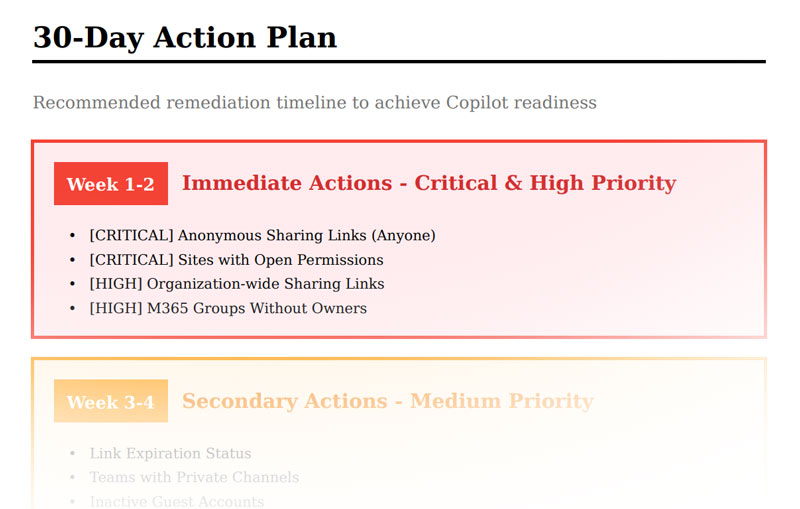
Every assessment includes a 30-Day Action Plan — with critical and high-priority items front-loaded in Weeks 1–2 so your team knows exactly where to start.
What You'll Walk Away With
Who This Is For
This assessment is for any organization using — or planning to use — Microsoft 365 and Microsoft Copilot. If you're responsible for your company's data security, technology strategy, or AI adoption, this is your essential first step.
You don't need to already be using Copilot to benefit. Whether you're actively planning a rollout, evaluating your options, or just concerned about how your M365 environment is currently configured — this assessment gives you the facts you need to move forward with confidence.
Copilot won't fix a misconfigured environment — it will amplify it. The right move is to understand your exposure first, remediate what needs fixing, and then unlock the full productivity potential of AI on a secure foundation.
Request Your AI Assessment