
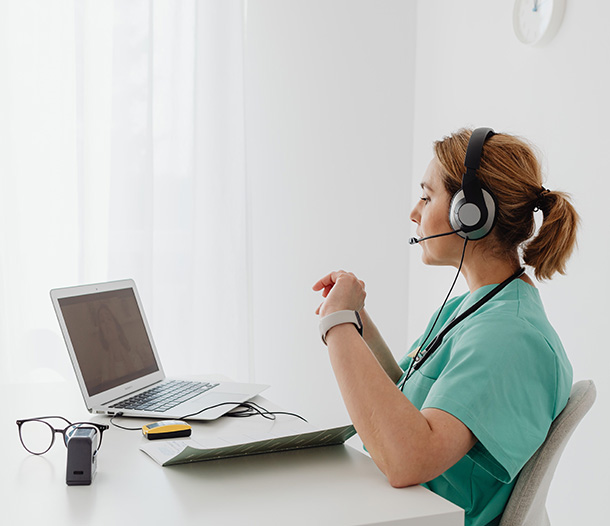



Your 2:15 PM patient logs on right on time. Thirty seconds later, your image freezes mid-sentence in an expression nobody would pick for a portrait, and the audio drops out completely. By the time everyone reconnects, what once was a 15-minute visit has now eaten half an hour of time, and your patient is left wondering whether next time they should just book an in-person visit.
Telehealth only works when the technology underneath it does. In this post, I’ll run through the IT foundations that help keep virtual visits secure and reliable, and where a managed IT partner comes into play.
What Technology Does Telehealth Actually Run On?
Every virtual visit sits on three layers, and a weak spot in any one of them shows up on screen.
- The video platform and your EHR. The platform runs the visit itself. When it ties into your EHR, scheduling, visit links, and notes stay in one place instead of getting copied between windows.
- Clinician and staff devices. Laptops, webcams, headsets, and the tablet at the front desk all count. An aging laptop can stutter on video even with a fast connection.
- The internet connection. At the office, that’s your business circuit and Wi-Fi. For providers who see patients from home, it’s whatever their household plan delivers while the kids are streaming cartoons.
That last layer is the one most practices often forget is part of their setup.

What Keeps a Virtual Visit from Freezing?
Reliability is mostly tied to bandwidth, backup, and some unglamorous preparation. Turns out, unglamorous is exactly what you want from a video visit.
Bandwidth isn’t just the speed printed on your internet plan; it’s what’s left over when six exam rooms, the billing team, and a cloud backup are all sharing the same line. Video needs steady upload speed, not just download, plus Wi-Fi that actually reaches the rooms where providers sit. Your telehealth platform publishes its own requirements, and those are the numbers to test against.
Backup connection
A backup connection matters more than most practices expect. When the primary line drops, a secondary circuit or cellular failover can keep visits running before anyone notices. HHS’s own telehealth guidance points out that dropped calls and bad connections can lead to distrust and frustration for patients.
Device setup and testing
Device setup and testing closes the loop. Updated software, a checked camera and mic, and a short practice call before the first real visit catch most problems while nobody’s waiting on the other end.
How to Keep Telehealth Visits Private
Good telehealth security starts with the platform it runs on. During the pandemic, regulators temporarily relaxed HIPAA enforcement so providers could use everyday video apps. That grace period ended in 2023. Today, HHS states that covered providers must use telehealth vendors that comply with HIPAA and will sign a business associate agreement (BAA), a contract committing the vendor to protect patient information.
That gives you a short checklist for a HIPAA compliant telehealth setup:
Confirm the vendor offers a healthcare plan, not just its consumer version.
Get the BAA signed before the first patient visit and keep it somewhere you can find it.
Review how the platform handles recordings, chat, and file sharing.
Next comes authentication and account hygiene for clinician accounts. HHS’s voluntary Cybersecurity Performance Goals for healthcare list multifactor authentication (MFA) and unique credentials among their essential practices. In plain terms: every clinician gets their own login, MFA stays on, and accounts close the day someone leaves. Shared logins feel convenient right up until nobody can say who did what.
Requirements vary by practice, so confirm your specific obligations with your compliance advisor or counsel.
How Can an IT Partner Support Clinicians and Patients?
When a provider’s camera quits five minutes before a visit, they need a person, not a ticket queue. Our 24/7 helpdesk assists with getting clinicians back on screen fast, and 24/7 monitoring often flags network trouble before anyone feels it.
02 Simple Guides for Patients
We help your team build one-page joining instructions in plain language: which link to click, how to allow the camera, and who to call. That means fewer “can you hear me?” minutes at the start of every appointment.
03 Troubleshooting Common Issues
Most telehealth problems repeat themselves: blocked camera permissions, outdated browsers, weak home Wi-Fi. We document the fixes so your front desk can handle the easy ones and hand the rest to us.
How Do You Plan for Telehealth Growth?
A setup that works for one provider doesn’t always stretch to ten. Before adding providers or locations, check whether your platform licenses, devices, network capacity, and support process can absorb the extra visits. Adding capacity on a calm Tuesday beats scrambling for it in the middle of flu season.
Once visits are running, track how they actually go. Dropped calls, late starts, and patient feedback surveys show where the technology helps and where it gets in the way. A string of complaints from one location usually points to a network issue, not a people issue.
Then review your tools at least once a year. Vendors change features, pricing, and integrations, and your practice’s needs shift too. A quick annual check keeps you from paying for a platform you’ve quietly outgrown.
Telehealth only works when the technology underneath it does.
LG Networks Can Help Your Practice Deliver Better Virtual Care
LG Networks provides healthcare IT services in Dallas, including telehealth IT support for practices that want virtual visits to feel as dependable as in-person ones. As your outsourced IT department, we deliver the managed IT services Dallas practices count on: a 24/7 helpdesk for clinicians, 24/7 monitoring, network management, managed Wi-Fi in Dallas offices, cloud services and backups, healthcare cybersecurity, and compliance support. We also coordinate with your telehealth and EHR vendors, so your team isn’t stuck playing phone tag between them.
Whether you need everyday IT support for medical practices or a partner to plan your next telehealth expansion, our IT support in Dallas is built around keeping your schedule on track.
What would your day look like if every virtual visit just started on time?
Take the first step. We’ve got you covered.
Talk to LG Networks →